Agents are safer
Folder ACLs, glob-scoped keys and sparse workspaces keep an agent inside its paths. Everything else has no listing entry, no open, no create.
Permissions guide →Stop waiting for file transfers. Open multi-terabyte projects without copying them to every laptop. Every save is versioned, and each agent gets a workspace.
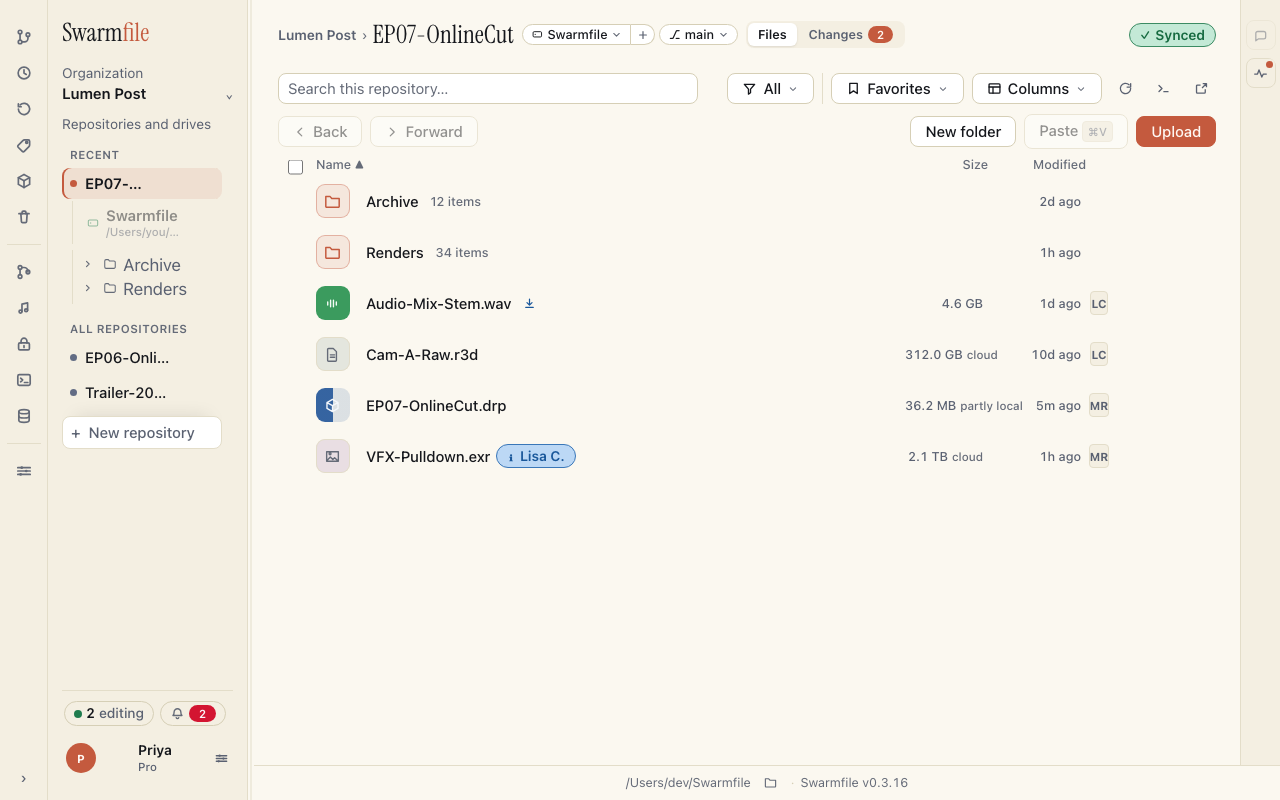
The desktop app, open on a 4.1 TB example project.
Media & audio: DaVinci Resolve · Premiere Pro · Nuke · Houdini · Blender · Ableton Live
AEC & geo: Revit · AutoCAD · Civil 3D · QGIS · ArcGIS Pro
Developers & AI: Claude Code · Cursor · Codex · Copilot · Git · Git LFS · MCP
…and any app that opens files.
Swarmfile can become your Git host without changing how your team works. Branches, reviews, CI and commit ids keep working; switch when you’re ready
- self-hosted or on our cloud.
Branches, reviews and CI keep working, commit ids are preserved, and the Git verbs you know still work.
Import branches, tags and history without rewriting commit ids.
Existing LFS clients keep working on plaintext repositories; managed repositories use the transfer agent.
Keep GitHub, GitLab or Gitea, or move the repository when you’re ready.
Folder ACLs, edit locks and an audit trail ship with the filesystem - plus encryption at rest on paid private repositories.
Keep it, and put the largest files on Swarmfile. See the LFS path →
One project, one history: agents stay inside their paths, writes are version-checked, and every turn can be rewound.
Illustrative session · real commands. The agent never sees or writes outside src/**.
Folder ACLs, glob-scoped keys and sparse workspaces keep an agent inside its paths. Everything else has no listing entry, no open, no create.
Permissions guide →No lock held while a model thinks; locks stay opt-in. A write carries the version it read.
Coding agents →A stale write is refused, re-read and re-applied. Disjoint changes land; real conflicts surface.
Branching guide →Every agent turn can be its own checkpoint. Restore the last good version, or diff exactly what the run changed.
Checkpoint command →How Swarmfile compares with the tools it is usually weighed against. The full matrix - including where each vendor wins - is on the comparison page.
Where they lead: LucidLink holds SOC 2 Type II today; Perforce has decades at extreme scale; GitHub is the full forge. Resilio is the other full P2P option. Where we’re behind: SOC 2 is not started (Type I planned); git push is fast-forward only.
| Vendor | Open a workspace & stream | Branch, merge & review | LAN peer-to-peer | Nothing to run yourself | File locking |
|---|---|---|---|---|---|
| Swarmfile | Open a workspace & stream✓Every OS | Branch, merge & review✓Built in | LAN peer-to-peer◐Public on Free; private from Starter | Nothing to run yourself✓Managed | File locking✓Cooperative, every OS |
| GitHub LFS | Open a workspace & stream-Downloads on checkout | Branch, merge & review✓Git + pull requests | LAN peer-to-peer-No | Nothing to run yourself✓Managed | File locking✓git lfs lock |
| Perforce | Open a workspace & stream-Sync a workspace | Branch, merge & review✓Streams + Swarm | LAN peer-to-peer◐Proxy / Edge per site | Nothing to run yourself◐Server, or Cloud tier | File locking✓Exclusive checkout |
| LucidLink | Open a workspace & stream✓Every OS | Branch, merge & review-Snapshots only | LAN peer-to-peer◐TeamCache box | Nothing to run yourself✓Managed | File locking✓Yes |
✓ Included◐ Partial or conditional- Not offered
Four of the eight tools we track.
Also compared: Resilio · Egnyte · ACC · Lore · see all eight →
The model is content-addressed and versioned; the interface is a filesystem. Every file is chunked, hashed and versioned, and a read fetches only the missing ranges.
Why it’s differentThe hub is a control plane, not a data plane. Reads prefer LAN peers; object storage is only the fallback.
Mutable, versioned metadata on a POSIX filesystem - not a content-addressed blob network you have to build a filesystem on.
Paths, history, locks and a local workspace. Object storage is only the byte fallback.
$swarmfile mounts open ~/Swarmfile/EP07-OnlineCut
opened EP07-OnlineCut at ~/Swarmfile/EP07-OnlineCut (main)
$swarmfile fetch Audio-Mix-Stem.wav --start 0 --len 16
range read 0-16 B of 4.6 GB
peer 10.0.0.14 · 1.9 Gb/s · 0 B from cloud
$swarmfile status
branch main · 3 peers · 2 saves queued
$swarmfile log --limit 3
9f2c1a7 mix v7: Priya
3b7e0d2 stem export: vocals
6a1d0f4 add reference mix
Example session; numbers and speeds are illustrative.
If an app opens a file, it can open the project.
Resolve, Premiere, Nuke, Houdini and Blender open the project directly. The first frame arrives without the rest of the footage.
Ableton Live sets, stems and references: version the Set, hand off stems by role, and let collaborators work without a full copy. The music template and swarmfile stems tools are built in.
Revit, AutoCAD, Civil 3D, QGIS and ArcGIS Pro open the model directly. Lock for editing, branch and audit every change.
Give each agent a workspace and a checkpoint per turn. Line-level blame shows which agent wrote what.
Point your existing Git LFS at Swarmfile and the largest files stop living on your Git host. Keep the host, keep the clients, move the bytes.
Keep your Git host; point LFS at Swarmfile and the largest files stop living there. Stock clients push to ~5 GiB on plaintext; the agent handles 256 GiB on managed. Egress is free on every plan.
[lfs]
url = https://<hub>/orgs/<org>/lfs/<repo>Clone and push through the helper; branches, history and commit ids carry over. Public repositories clone anonymously.
git clone swarmfile://<org>/<repository>
git pushImport branches, tags and original commit ids. LFS-tracked branches, submodules and octopus merges stay on the old host; keep the source until you verify.
swarmfile git import <url>Office cache, migration and ransomware rollback - the reasons a pilot turns into a rollout.
Talk to us about a pilot →An always-on seed serves blocks over the LAN; the hub mirrors the repository to object storage. Pro and above. Liveness and per-cache bytes live in Settings.
Office caches →swarmfile-migrate reads local, NAS or S3-compatible storage, resumes an interrupted run and verifies every CID.
Migration guide →Per-machine write bursts pause writes instead of disconnecting; an owner can roll every repository back to 60 seconds before the burst. Appeals and false-positive rates are in Quarantine.
Quarantine & rollback →Start free. Pay per seat when the team grows. Self-host the server for free.
5 GiB
100 GiB per seat
625 GiB per seat
1280 GiB per seat
Custom capacity
Starter, Pro and Studio: 7-day trial, up to 2 seats, card on file - nothing charged until day 7. Egress free on every plan. EU/US residency on every paid plan. At the spend cap, reads keep working.
Pro includes 625 GiB per seat - 10 seats is 6.1 TiB, enough for a 5 TiB project. Extra storage is $4/100 GiB; CI is metered from $0.00001/sec. Full rates on the pricing page. Planning a 5 TiB project? Talk to us about a pilot.
Open it in the apps you already use. The versions, audit trail and workflows happen underneath. The server and tools are 14 open-source projects: 13 MIT/Apache-2.0 plus the LGPL libfuse3 source.
Self-host the open-source server free - workspace, Git, LFS and swarm. Merge requests, hosted CI, webhooks, previews and the managed control plane are cloud/Enterprise.
Free plan: 5 GiB storage, no card · Pro trial: 7 days, up to 2 seats, card on file - nothing charged until day 7